Find every weakness. Get the exact fix. Catch them if they get in.
Most scanners hand you a list of problems and leave. Profscann finds the weaknesses, writes the exact fix for your setup, and then sets traps that tell you the moment an intruder touches anything — with their IP address, in seconds.
- AI writes copy-paste fixes matched to your server and CMS
- Sentinel guards your live site from inside your own code
- Tripwire alerts you the instant someone gets in — not months later
- First scan free — no signup, results in about a minute
yourbusiness.com
Scanned just now
Security
88
SEO
94
Illustrative example — your report will reflect your site's real results.
Security headers
CSP, HSTS, X-Frame-Options and more.
TLS / SSL
Certificate expiry and outdated protocols.
Exposed files
.env, .git, backups reachable from the web.
On-page SEO
Titles, meta tags, headings, sitemaps.
Powered by AI
Other scanners tell you what's wrong. Profscann tells you what to do.
Every finding comes with fix instructions written for your actual server and CMS — not generic advice you still have to research.
Typical scanner
Missing Content-Security-Policy
Severity: Medium. The Content-Security-Policy header is not set.
…now go and work out how to fix it.
Profscann with AI
Missing Content-Security-Policy
We detected LiteSpeed + WordPress, so here's the exact block for your .htaccess:
Header set Content-Security-Policy
"default-src 'self'; img-src 'self' data:"
Plus what it might break, and how to check it worked.
AI fix playbook
Copy-paste configuration for your exact stack, with a warning about what could break and a step to verify the fix worked.
Plain-English summary
A short, jargon-free summary of your whole report — written so you can forward it straight to a client or your boss.
Ask your report
Type a question like "which issue is most urgent?" and get an answer based only on your own scan results.
Change explanations
When a monitored site changes, the alert email explains in plain language why your score moved and what to do first.
AI explanations are grounded strictly in your own scan results — Profscann never invents vulnerabilities, and always tells you to review a configuration change before applying it.
See it in action
Your whole report, in one place
Graded scores, prioritised issues, AI fixes and a shareable PDF — on desktop and on your phone.
New · Profscann Sentinel
A scan tells you about last Tuesday.
Sentinel watches right now.
Paste one small file into your site. Every request that arrives gets checked against nine attack patterns before your page runs — on your server, in under a millisecond, with no call to us.
Cannot slow your site
Detection is local regex on your own server. Nothing waits on us.
Cannot break your site
Every call to us is wrapped and swallowed. If Profscann vanished, your site would not notice.
Cannot leak your data
Passwords, card numbers and form contents never leave your server. Credential-shaped fields are stripped before sending.
Watch before it blocks
Ships logging what it would have stopped. You flip it to blocking once a day of real traffic looks clean.
Ready-made for your stack
Works on shared hosting. No Composer, no dependencies, no server access needed.
Get my guard codeReal screens, not mockups
This is what you actually get
Every screen below is a live capture of Profscann scanning Profscann. Same report you get on your first free scan.
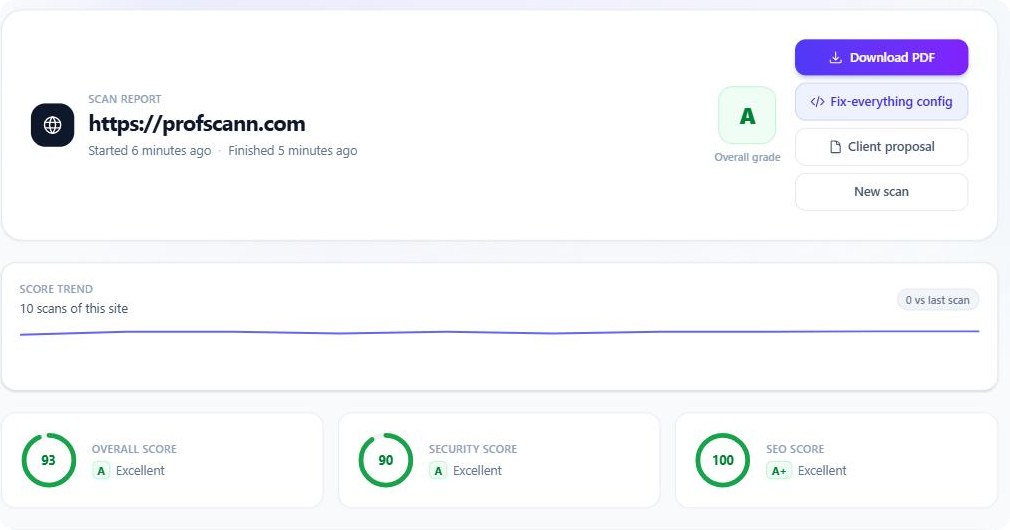
Your grade in one glance
A letter grade, three scores, and compliance indicators for PCI-DSS, GDPR, SOC 2 and ISO 27001 — mapped from the issues actually found, not a generic checklist.
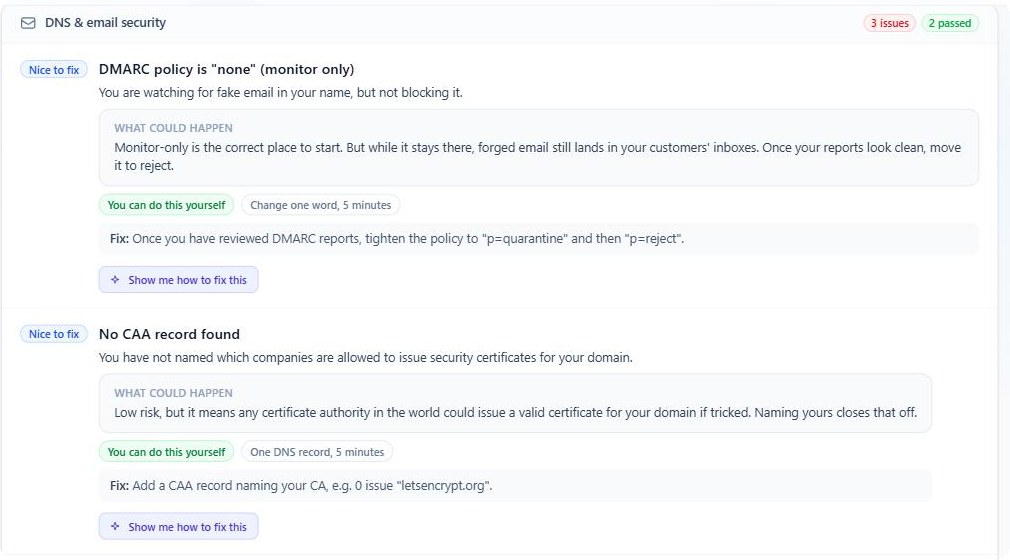
Written so you can act on it
Every issue explained without jargon, with what could actually happen, who can fix it, and how long it takes. The green label means you can do it yourself — no developer needed.
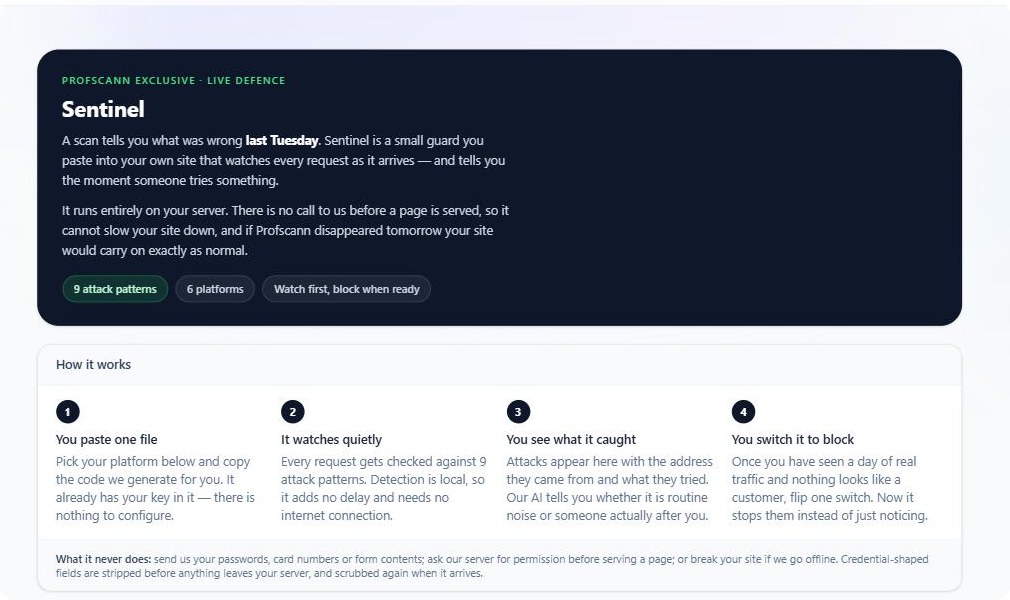
Guard code, generated for you
Pick your platform, copy the file, paste it in. Your key is already embedded — there is nothing to configure.
Nobody else does this
Scanning finds holes.
Active Defence catches people.
The average breach goes unnoticed for over 200 days. Attackers depend on that silence. These four tools take it away from them — and they exist nowhere else in a tool you can just sign up for.
Sentinel
A guard inside your own site
Paste one small file into your site and every request gets checked against nine attack patterns as it arrives — SQL injection, cross-site scripting, command injection, config-file probing. It runs entirely on your server, so it cannot slow your site down, and if we went offline tomorrow your site would carry on exactly as normal. Starts in watch mode; you switch it to blocking when you have seen a day of real traffic.
Tripwire
They can't steal what's fake
Plant bait that unlocks nothing — a fake AWS key, a fake admin URL, a fake "customer_export.xlsx". No real user or process ever touches them. So the second anything does, you know you've been breached, with their IP, in seconds. They just get a plain "page not found" and never learn they were seen.
Impersonation Radar
See the phishing site before your customers do
Fake sites need an SSL certificate before they go live — and every certificate is published publicly within minutes. We watch those records for domains impersonating you, and hand you a ready-to-send takedown notice.
Skimmer Watch
Catch the card skimmer mid-attack
Card skimmers don't add a script — they quietly edit one your page already trusts. The URL never changes, so nothing looks different. We fingerprint the actual code and alert you the moment a byte moves.
Purely defensive. Profscann records what someone chose to do and alerts you — it never attacks back and never touches anyone else's systems.
End to end
Protected before, during and after you ship
Most tools cover one moment. Profscann covers the whole life of your site.
1. Before you deploy
Code audit
Upload your project and we read the source for hardcoded keys, SQL injection, dangerous functions and outdated packages — with the exact file and line. Your code is deleted the moment the scan finishes.
2. The moment you're live
Website scan + Twin Lab
Headers, TLS, cookies, DNS, blacklists and SEO — plus a safe clone of your page where we prove the exploit instead of just warning you about it.
3. Every day after
Server agent + monitoring
A read-only agent reports your live server posture — permissions, patches, open ports, certificates. We never hold your credentials and can't run anything on your machine.
4. While people attack
Sentinel
A guard inside your own code checks every request as it arrives, logs what it would have blocked, then blocks it once you say so. Local, fast, and it fails open — we can never break your site.
5. If someone gets in
Active Defence
Tripwire, Radar and Skimmer Watch turn a silent breach into an immediate alarm with an IP address.
How it works
From URL to action plan in three steps
No agents to install, no DNS changes, no config. Paste a link and Profscann does the rest.
Paste your URL
Enter any website you own. Profscann fetches it exactly like a real browser and inspects the response.
We run every check
Security headers, TLS, cookies, exposed files, server leaks and on-page SEO — dozens of checks in a single non-intrusive pass.
Get a graded plan
A letter grade, a prioritised fix list, a shareable trust badge, and a clean PDF — emailed to you if you like.
Full coverage
Everything Profscann inspects
One scan covers what usually takes five or six separate tools — including DNS, email spoofing and blacklist checks most scanners skip entirely.
Security headers
- Content-Security-Policy
- Strict-Transport-Security (HSTS)
- X-Frame-Options & X-Content-Type-Options
- Referrer-Policy & Permissions-Policy
TLS / SSL
- Certificate validity & days-to-expiry
- Outdated protocols (TLS 1.0/1.1)
- TLS 1.3 support
- Early warning before your certificate expires
DNS & email security
- SPF, DKIM & DMARC — stop others spoofing your email
- DNSSEC signing
- CAA certificate-authority locking
- Catches gaps most scanners never look at
Reputation & blacklists
- Spamhaus, SpamCop, SORBS & Barracuda listings
- Google Safe Browsing malware flags
- Warns you if your IP is hurting email delivery
- Find out before your customers do
Technology & takeover risk
- Detects your CMS, framework & server
- Flags exposed software version numbers
- Dangling subdomain takeover checks
- Powers the stack-aware AI fixes
AI deep code analysis
- API keys & tokens leaked in your page source
- Internal or staging URLs left in the code
- Sensitive notes in HTML comments
- Insecure forms, mixed content & outdated libraries
Compliance indicators
- PCI-DSS 4.0 — if you take card payments
- GDPR — if you handle EU/UK personal data
- SOC 2 & ISO 27001 control references
- Shows exactly which finding maps to which requirement
Cookies & sessions
- Secure, HttpOnly & SameSite flags
- Cookie domain, path & expiry
- Third-party cookie exposure
- Full cookie inventory in the report
Exposed files & server info
- .env, .git, backups & dumps reachable from the web
- Directory listing exposure
- Leaky Server / X-Powered-By headers
- Debug & stack-trace disclosure
On-page SEO
- Title, meta description & canonical
- Headings, robots & sitemap.xml
- Indexability & noindex blockers
- One-click submit to search engines (IndexNow)
Deep vulnerability scan (optional)
- Authorized active/penetration scan
- CVE, exposure & misconfiguration templates
- Default-login & takeover checks
- For sites you own or are authorised to test
Why Profscann
Built to be understood, not just to scan
Most scanners hand you a wall of raw findings. Profscann turns them into something you can act on and share.
Fixes, not just findings
AI turns every issue into copy-paste configuration for your exact server and CMS — the step other scanners leave you to figure out alone.
Letter-graded scoring
A single A–F grade for security and SEO, weighted by real severity — so you know where to start.
PDF report to your inbox
Tick a box and the full graded report lands in your email the moment the scan finishes — ready to forward to a client or your team.
Continuous monitoring
Re-scan automatically on a schedule and get alerted the instant your score drops or a new critical issue appears.
Shareable trust badge
Embed a live grade badge on your site and share a public report link that shows your score — without exposing raw vulnerabilities.
Trend & what-changed
See your score over time and a clear diff of what was fixed and what regressed since your last scan.
Free to start
Run your first scan as a guest — no signup. Create a free account for unlimited scans, a dashboard and monitoring.
FAQ
Common questions
Is scanning safe for my live site?
Yes. The default scan is completely non-intrusive — it only reads what your site already sends to any visitor, so it is safe to run anytime. The deep vulnerability scan is optional and clearly labelled, and should only be run on sites you own or are authorised to test.
Do I need to install anything?
No agents, no plugins, no DNS changes. Paste a URL and you get results in minutes.
Can I get the report by email?
Yes — tick "Email me the PDF report" on the scan form and the full graded report is sent to your inbox the moment the scan finishes. Monitored sites can email you automatically whenever something changes.
What does the letter grade mean?
It is a weighted score out of 100 for security and SEO, converted to an A–F grade. More severe issues cost more points, so the grade reflects real risk rather than a raw issue count.
Is it really free?
You can run a scan as a guest with no signup. A free account unlocks unlimited scans, a saved history dashboard, shareable badges and continuous monitoring.
How does the AI actually help?
Profscann detects which server and CMS you run, then generates fix instructions for that exact setup — the .htaccess block, the Nginx directive, or the WordPress step, ready to copy and paste. It also writes a plain-English summary of your report and answers questions about your results.
Can I trust AI with security advice?
The AI is only ever shown findings Profscann actually detected. It is instructed never to invent vulnerabilities and never to claim a site is fully secure, and it always tells you what a change might break and how to verify it. Treat it as a knowledgeable first draft — review any configuration change before applying it, as you would with advice from anyone.
Find out what's exposed — in about a minute
Free scan, no signup, no install. You'll get your A–F grade, the exact fixes for your setup, and a PDF you can share.